DI(Dependency Injection)

B/C객체가 외부에 생성되어 A객체에 주입됨
스프링은 객체를 생성 라이프사이클 관리 및 필요로 하는 객체에 의존 주입을 하는 라이브러리 집합체라고 할 수 있다.
스프링 의존 주입
- bean configuration xml을 이용한 의존 주입 => 스프링 부트에서는 사용하지 않음 (xml의 과도한 설정을 없애기 위해)
- 자바 코드를 이용한 의존 주입 => 스프링 부트에서는 필요한 경우에만
- 어노테이션을 이용한 의존 주입 => 스프링 부트에서 가장 많이 사용
어노테이션
@SpringBootApplication의 세가지 기능
1)@Configuration
- 자바 코드로 작성된 클래스를 설정파일이라고 지정함
2) @EnableAutoConfiguration
- 스프링 어플리케이션 컨텍스트(Application context)를 만들 때 지정해 둔 설정값들을 이용하여 자동으로 설정하는 기능
3) @ComponentScan
- 지정한 위치 이하에 있는 @Component와 @Configuration이 붙은 class를 스캔해서 Bean으로 등
- @Configuration
- 클래스를 스프링 설정으로 사용함
- @Bean
- 매서드의 리턴 값을 빈 객체로 사용함을 의미
Java Code로 DI 사용하기
package com.study.springboot.bean;

import org.springframework.context.annotation.Bean;
import org.springframework.context.annotation.Configuration;

@Configuration
public class Config {
    // 빈(bean) : Spring이 IoC 방식으로 관리하는 객체
    // 빈 팩토리(BeanFactory) : 스프링의 IoC를 담당하는 핵심 컨테이너
    // 어플리케이션 컨텍스트(ApplicationContext) :
    //                빈 팩토리를 확장한 IoC 컨테이너

    @Bean
    public Member member1() {
        // Setter Injection (Setter 메서드를 이용한 의존성 주입)
        Member member1 = new Member();
        member1.setName("홍길동");
        member1.setNickname("도사");
        member1.setPrinter(new PrinterA());

        return member1;
    }

    @Bean(name="hello")
    public Member member2() {
        // Constructor Injection (생성자를 이용한 의존성 주입)
        return new Member("전우치", "도사", new PrinterA());
    }

    @Bean
    public PrinterA printerA() {
        return new PrinterA();
    }

    @Bean
    public PrinterB printerB() {
        return new PrinterB();
    }
}
class 만들고 bean 등록하기 (= bean 4개 등록)
- 스프링 부트는 @configuration이 붙어있는 클래스를 설정파일로 사용
- @bean은 클래스 이름 앞에 붙을 수 있고 메서드 이름 앞에 붙을 수도 있는데 메소드 앞에 붙으면 메서드의 리턴값을 bin으로 등록해 사용
- 기본적으로 메서드이름이 빈이름으로 등록되는데 따로 지정도 가능
- 기본적으로 메서드이름이 빈이름으로 등록되는데 따로 지정도 가능
스프링 부트는 기본적으로 @SpringBootApplication으로 모든 설정이 자동으로 실행된다
지금은 java코드로 설정파일을 만들어보자
package com.study.springboot;

import com.study.springboot.bean.Config;
import com.study.springboot.bean.Member;
import com.study.springboot.bean.Printer;
import org.springframework.boot.ApplicationArguments;
import org.springframework.boot.SpringApplication;
import org.springframework.boot.autoconfigure.SpringBootApplication;
import org.springframework.context.ApplicationContext;
import org.springframework.context.annotation.AnnotationConfigApplicationContext;

//@SpringBootApplication
public class Ex02JavaCodeDiApplication {

	public static void main(String[] args) {
		//SpringApplication.run(Ex02JavaCodeDiApplication.class, args);

		//1. IoC컨테이너 설정
		//config에 있는 class 4개를 컨테이너 생성
		ApplicationContext context =
				new AnnotationConfigApplicationContext(Config.class);

		//2. Member Bean 가져오기
        //등록한 bean의 이름으로 변수에 해당 객체를 주입시킴
		Member member1 = (Member) context.getBean("member1");
		member1.print(); // 주입했으므로 매세드 호출가능

		//3. Member Bean 가져오기 => 형을 지정해서 가져와서 형변환필요x
		Member member2 = context.getBean("hello", Member.class);
		member2.print();

		// 4.PrinterB Bean 가져오기
		Printer printer = context.getBean("printerB", Printer.class);
		member1.setPrinter(printer);
		member1.print();

		// 5.싱글톤인지 확인
		if (member1 == member2) {
			System.out.println("동일한 객체입니다.");
		} else {
			System.out.println("서로 다른 객체입니다.");
		}
	}

}
1번 실행결과
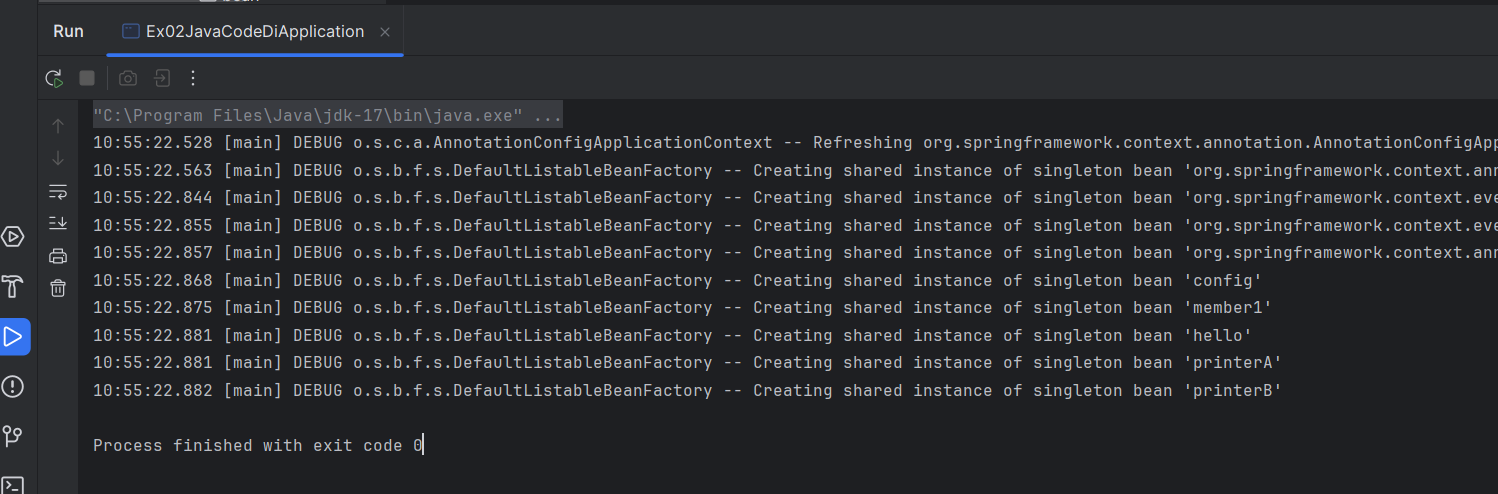
싱글톤 개체로 빈 4개가 등록된 것 확인 가능

member2는 객체의 메서드에 의해 리턴되는 객체의 이름을 hello로 지정했기 때문에 member2가 아니라 hello로 등록
2,3,4,5번 실행결과

member1과 member2는 둘다 new로 만들어졌기 때문에 서로 다른 것~
Annotation으로 DI 사용하기
- @Component
- 주입이 돼서 사용되는 애들
- @bean과 똑같은 기능인데 springboot에서는 @component를 많이사용
- 이름을 지정하지 않으면 클래스 이름에서 첫글자가 소문자로 바뀌어서 저장됨
- @Controller
- 어떤 기능을 수행하는 애들
- @bean중 하나
- @Autowired
- 값이 아니라 객체 또는 객체로 만들어진 빈 등록할때 사용
- @Qualifier
- 등록한 빈의 이름을 명확하게 지정
- @Value
- 변수 값을 지정
위의 어노테이션이용해서 config.java파일 설정하기
package com.study.springboot.bean;

import org.springframework.beans.factory.annotation.Autowired;
import org.springframework.beans.factory.annotation.Qualifier;
import org.springframework.beans.factory.annotation.Value;
import org.springframework.stereotype.Component;

@Component
public class Member {

    @Value("홍길동")
    private String name;
    @Value("도사")
    private String nickname;

    //printer는 값이 아니고 객체나 이 객체로 만들어진 빈을 등록해야함
    @Autowired
    @Qualifier("printerA")
    private Printer printer;

    public Member() {}

    public Member(String name, String nickname, Printer printer) {
        this.name = name;
        this.nickname = nickname;
        this.printer = printer;
    }

    public void setName(String name) {
        this.name = name;
    }
    public void setNickname(String nickname) {
        this.nickname = nickname;
    }
    public void setPrinter(Printer printer) {
        this.printer = printer;
    }
    public void print() {
        printer.print("Hello " + name + " : " + nickname);
    }

}
controller설정
package com.study.springboot.bean;

import org.springframework.beans.factory.annotation.Autowired;
import org.springframework.beans.factory.annotation.Qualifier;
import org.springframework.stereotype.Controller;
import org.springframework.stereotype.Repository;
import org.springframework.web.bind.annotation.RequestMapping;
import org.springframework.web.bind.annotation.ResponseBody;

@Controller
public class MyController {

    //아까 만든 빈 객체를 주입받아 연결
    @Autowired
    Member member1;
    @Autowired
    @Qualifier("printerB")
    Printer printer;
    @Autowired
    Member member2;

    @RequestMapping("/")
    public @ResponseBody String root(){
        // 1.Member Bean 가져오기
        member1.print();

        // 2.PrinterB Bean 가져오기
        member1.setPrinter(printer);
        member1.print();

        // 3.싱글톤인지 확인
        if (member1 == member2) {
            System.out.println("동일한 객체입니다.");
        } else {
            System.out.println("서로 다른 객체입니다.");
        }

        return "Annotation 사용하기";
    }

}
실행시켜보면

1. member1이 생성될 때 printer A 주입받음 => printerA를 이용하여 출력함
2. printer변수에 printerB 주입되어 있음 => 이 값을 이용해 새 printer에 이 변수의 값을 넣어줌 => printerB를 이용하여 출력함
3. member1과 member2가 같은지 확인하는 것임 => 둘다 @Autowired로 자동주입받는데 bean은 싱글톤 객체로 만들어졌기 때문에 하나밖에 없음 => 같은 객체임
싱글톤(singleton) 객체는 소프트웨어 디자인 패턴 중 하나로, 클래스의 인스턴스가 하나만 생성되고 그 인스턴스가 프로그램 전역에서 사용될 수 있도록 하는 패턴
'개발 > Backend' 카테고리의 다른 글
| [SpringBoot] 예제로 배우는 스프링부트 입문 | JPA 기초 (0) | 2024.07.21 |
|---|---|
| [Spring Boot] 예제로 배우는 스프링부트 입문 | JdbcTemplate (0) | 2024.07.15 |
| [Spring Boot] 예제로 배우는 스프링부트 입문 | Form값 검증 (0) | 2024.07.07 |
| [Spring Boot] 예제로 배우는 스프링부트 입문 | Web 기초 (0) | 2024.07.06 |
| [JS 기초] CODEIT POWER BOOST 1주차 (0) | 2024.05.22 |


